


Blog
What Video to Put in Your Video Brochure


What Video to Put in Your Video Brochure
(That Actually Wins Business)
You’ve committed to a video brochure. Smart move. Now comes the question every buyer reaches eventually: what videos to put in your video brochure? Get this wrong, and a premium piece of kit becomes an expensive screensaver. Get it right, and it closes deals before your sales team even picks up the phone.
This guide is specifically for people who already know what a video brochure is and are in the production or briefing stage and struggling to know premium videos to put in video brochure. If you’re still comparing options, start here.
 —
Why the Premium Video Content Matters More Than the Brochure Itself
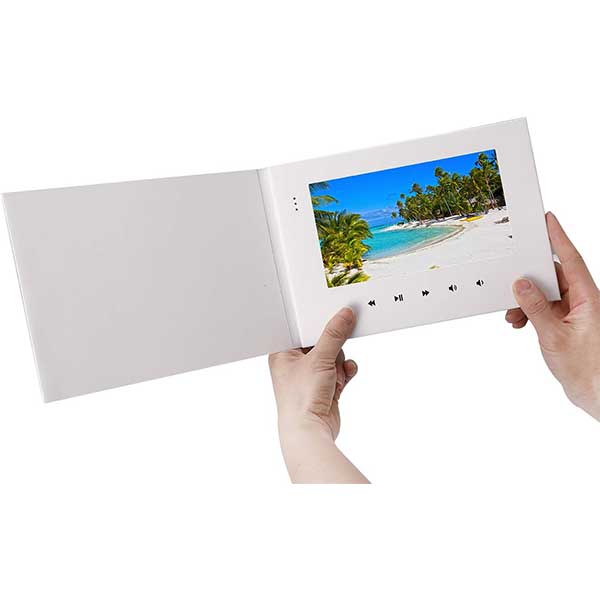
The hardware creates the moment — the sharp HD screen, the satisfying click when the cover opens, the autoplay that starts without the recipient doing a thing. You can check the variety of video brochures here.
But the video determines what happens next. Does your prospect keep watching? Do they call? Do they pass it to a decision-maker?
According to Wyzowl’s annual video marketing research, 89% of consumers say watching a brand video convinced them to make a purchase. That number is doing a lot of work — but only if the video itself is worth watching.
A video brochure is a controlled environment. There is no algorithm, no competing content, no skip button. You have the recipient’s hands, eyes, and ears for however long your video runs. That is an extraordinary opportunity — and it is entirely wasted if the video feels like a corporate PowerPoint with a voiceover. So you definitely need to know 5 premium videos to put in your video brochure
The Right Length for a Video Brochure Script
The most common mistake: making the video too long. The sweet spot for video brochure content is 60 to 90 seconds. That is enough time to tell a complete story — problem, solution, proof, call to action — without losing attention.
Two minutes is acceptable for complex B2B products or high-value investment pitches. Anything beyond that requires a genuinely compelling narrative, not just more information.
If you have more to say — product ranges, case studies, technical specs — many video brochures support multiple chapters accessible via buttons. Use those for depth. Use the main video for impact. In Dubaidigi after years of experience we came to these valuable premium video ideas to put in video brochure.
What Video Content Actually Works: Five Formats That Convert
1. The Problem–Solution Story
Open with a pain your audience recognizes immediately. Not your company, not your product — their problem. Then show how you solve it. This is the most universally effective format and works across sectors: real estate, finance, hospitality, logistics.
Example opening line: “Most investors make a decision in the first 90 seconds of a pitch. Here’s how to make sure those 90 seconds work.”
2. The Project Showcase
For architecture firms, interior designers, and property developers, the best corporate video brochure content is visual proof. A tightly edited 75-second walkthrough of your best project — with real footage, not 3D renders alone — does more than any written portfolio. This is especially powerful at GITEX, Cityscape, or any Dubai property expo where you are competing for attention in a packed hall.
3. The CEO / Founder Message
For high-stakes situations — investor roadshows, government tenders, VIP client introductions — a direct, confident 60-second message from leadership signals seriousness. Keep it personal and conversational, not scripted. Forbes reports that people form lasting impressions in under seven seconds; a founder speaking to camera on autoplay captures that window before the recipient has made a conscious choice.
4. The Before and After
Used heavily in fit-out, renovation, and retail display. Before-and-after video is visceral and persuasive. The contrast does the selling. If your work has a visible transformation — show it.
5. The Social Proof Reel
Client testimonials edited into a fast-moving 90-second sequence. Three clients, 30 seconds each, speaking to one specific result. Not “we loved working with them” — “we closed the deal at ADIPEC because of this piece.” Specificity is credibility.
 —
What to Avoid in Your Video Brochure Content
A few patterns that reliably kill the moment:
- Stock footage filler. Generic office handshakes and aerial cityscapes signal that you had nothing real to show. Use your actual work, your actual team, your actual results.
- Feature lists read aloud. “We offer 14 services across 6 verticals” is not a video. It is a spreadsheet with a voiceover. Benefits, not features.
- A weak or missing call to action. Every video brochure for sales needs to end with one clear next step. Scan this QR code. Call this number. Visit this page. One action, not three.
- Poor audio. The screen will look beautiful. If the audio crackles or the voiceover is muffled, the recipient’s attention breaks immediately. Invest in proper sound.
—
A Simple Video Brochure Script Formula
If you are briefing a production team — or writing the script yourself — this structure works reliably:
- Seconds 0–10: Name the viewer’s problem or goal. No intro, no logo, no “welcome.”
- Seconds 10–30: Show your solution in action. Real footage preferred.
- Seconds 30–60: Proof. One client result or one credible metric.
- Seconds 60–75: Call to action. One sentence. One step.
Simplicity is not a limitation here — it is the point. The brochure itself signals premium. The video needs to focus and convert.
Tailoring Video Brochure Content Ideas by Industry
Different sectors have different buyers, and different buyers need different proof:
- Real estate and property: Project walkthroughs, location highlights, off-plan renders with narration. Ideal for Ramadan gifting campaigns to VIP clients or investor welcome packs.
- Professional services (legal, finance, consulting): Founder message plus one client outcome. Avoid jargon. Keep it human.
- Hospitality and F&B: Atmosphere and experience. Show the room, the food, the feeling. Let the visuals carry the weight.
- Healthcare and wellness: Patient journey or facility tour. Reassurance and credibility are the goal.
- Technology and SaaS: Problem–solution story with a brief product demo clip. Keep the demo short — 20 seconds maximum.
Frequently Asked Questions
What is the best length for a video brochure video?
For most use cases, 60 to 90 seconds is the ideal length for video brochure content. This gives enough time to establish a problem, present your solution, include a proof point, and end with a clear call to action — without losing the viewer’s attention. Complex B2B or investment-focused brochures can stretch to two minutes, but this requires a genuinely strong narrative.
Can I include more than one video in my video brochure?
Yes. Most premium videos to put in your video brochures support multiple video chapters, accessible via tactile buttons on the device. A common setup is one main video that plays on open (60–90 seconds) plus two or three supporting chapters — a product demo, a client case study, or a capabilities overview. This lets you lead with impact and offer depth to viewers who want more.
Do I need a professional production team for the video?
For premium brochures destined for VIP clients, investors, or major pitches, professional production is strongly recommended. The brochure hardware is already a premium item — low-quality video creates a jarring contrast that undermines the whole impression. That said, a well-lit, clearly recorded founder message filmed on a modern smartphone can outperform a glossy but generic agency production. Authenticity matters more than polish.
What video to put in your video brochure if you have no existing footage?
Start with what you can control: a direct-to-camera message from a company leader, combined with still photography edited to motion. Many businesses use this format successfully while building out a full video library. The key is a strong script and clear audio — both are achievable without a large production budget.
—
If you’re ready to brief your video brochure or want to see what the finished product looks like across different formats, the team at dubaidigi.com can walk you through options, screen sizes, and pre-loaded content setups. Book a consultation and bring your content brief — or let them help you build one.